The Customer Satisfaction Assessment Excel Template for Retail enables businesses to efficiently track and analyze customer feedback to improve service quality. This template offers customizable survey fields, automated data visualization, and clear metrics for measuring satisfaction levels. Retailers can identify trends and make data-driven decisions to enhance the overall shopping experience.
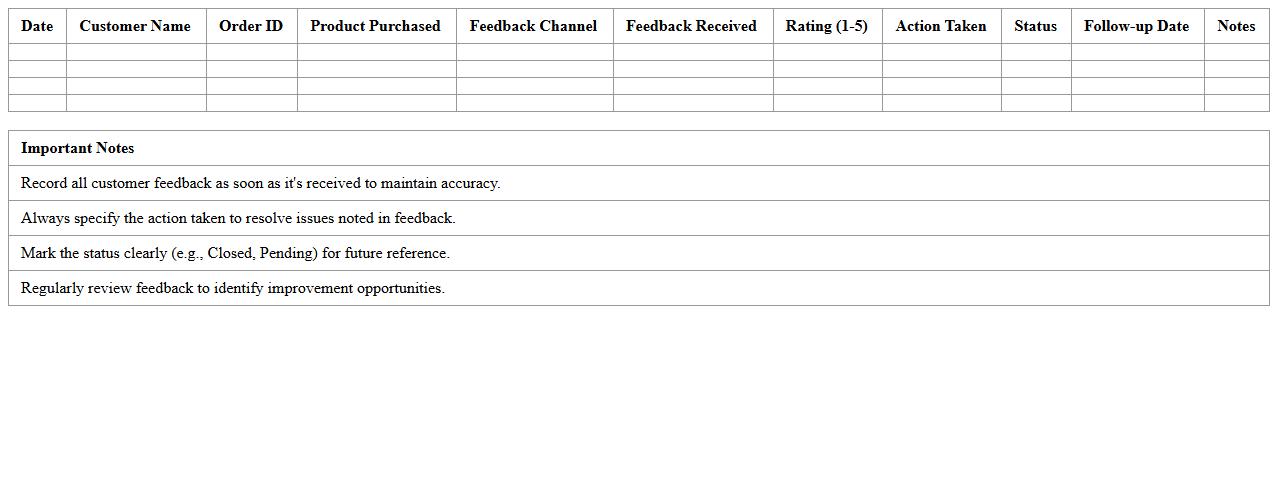
Post-Purchase Customer Feedback Tracker Excel Template
The
Post-Purchase Customer Feedback Tracker Excel Template is a structured document designed to systematically collect and analyze customer feedback following a purchase. It enables businesses to monitor customer satisfaction, identify trends, and address issues promptly, enhancing overall customer experience. By organizing feedback data in an accessible format, this template supports data-driven decision-making to improve products and services efficiently.
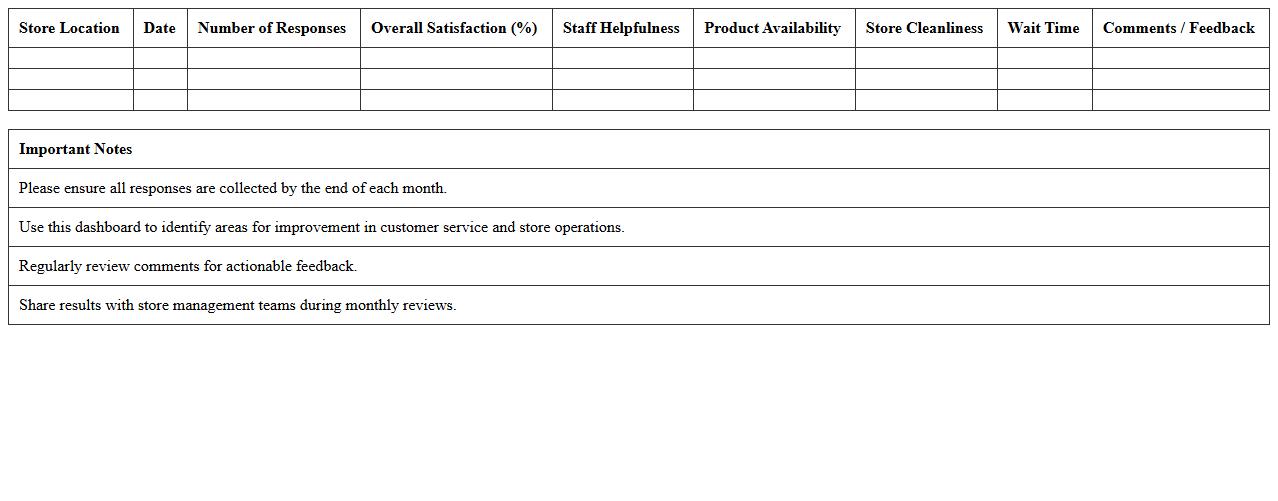
Retail Customer Satisfaction Survey Results Dashboard
The
Retail Customer Satisfaction Survey Results Dashboard document compiles and visualizes feedback from customers, providing actionable insights into their experiences and preferences. It helps identify key satisfaction drivers and areas needing improvement, enabling retailers to enhance service quality and boost customer loyalty. This data-driven approach supports strategic decision-making and drives continuous improvement in retail operations.
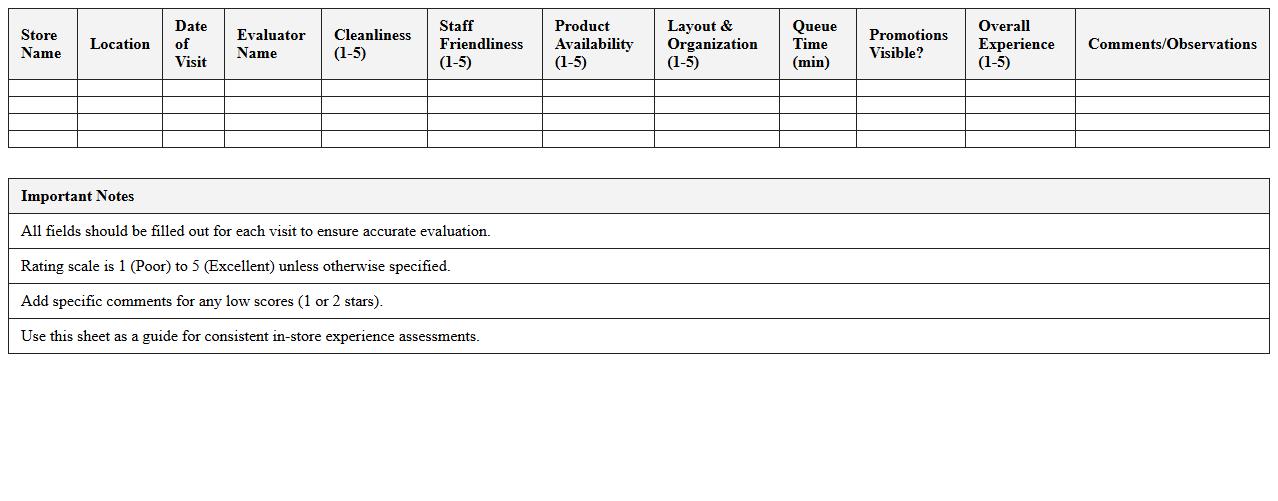
In-Store Experience Evaluation Excel Sheet
The
In-Store Experience Evaluation Excel Sheet document is a structured tool designed to assess various aspects of customer interactions and store performance, including layout, product availability, staff behavior, and overall ambiance. It helps businesses systematically collect, analyze, and interpret data to identify strengths and areas for improvement, enhancing the customer journey and boosting sales. By using this document, retailers gain valuable insights that support informed decision-making and strategic planning for store optimization.
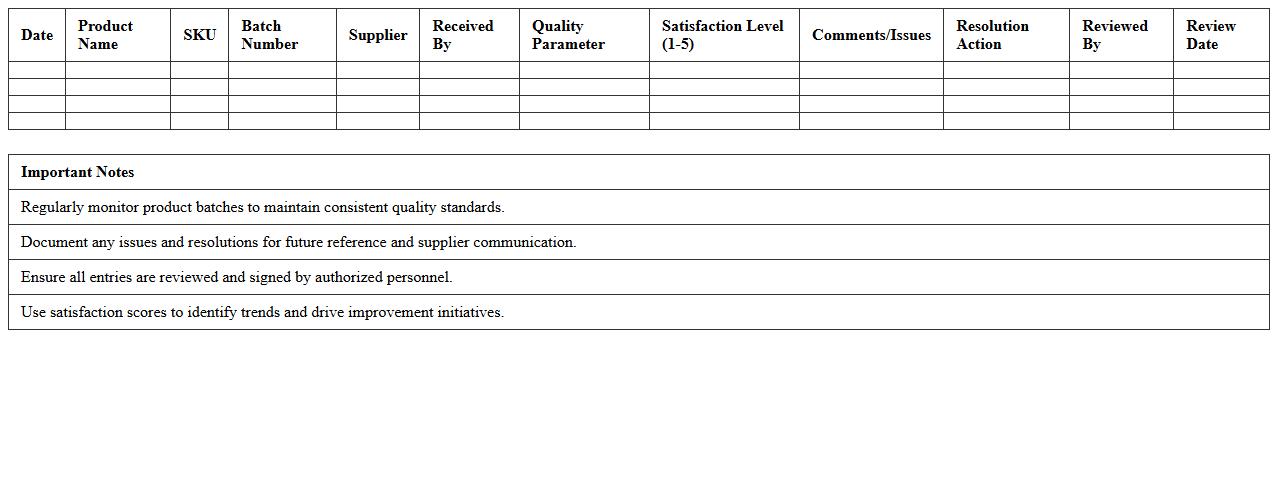
Product Quality Satisfaction Log for Retail
The
Product Quality Satisfaction Log for Retail is a detailed record that tracks customer feedback regarding product performance, defects, and overall satisfaction. This document helps businesses identify trends in product quality issues, enabling timely improvements and informed decision-making to enhance customer experience. By systematically analyzing the log, retailers can reduce returns, increase customer loyalty, and maintain higher standards of product excellence.
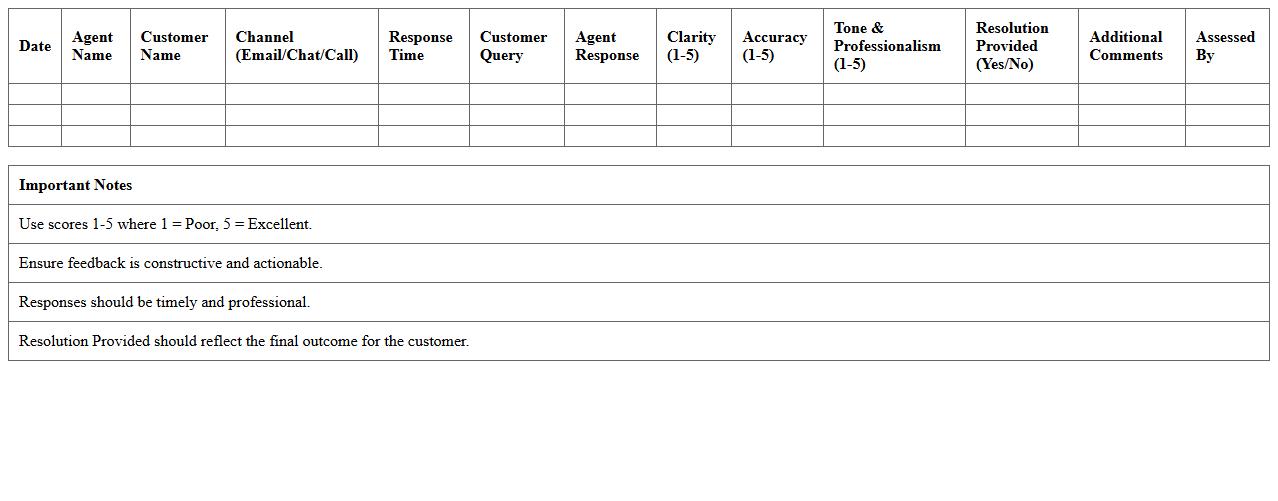
Customer Service Response Assessment Template
A
Customer Service Response Assessment Template document is a structured tool designed to evaluate the quality and effectiveness of responses provided by customer service representatives. It helps organizations identify strengths and areas for improvement in communication, ensuring consistent, clear, and empathetic interactions with customers. Utilizing this template enhances customer satisfaction, informs training programs, and supports the delivery of efficient, high-standard service.
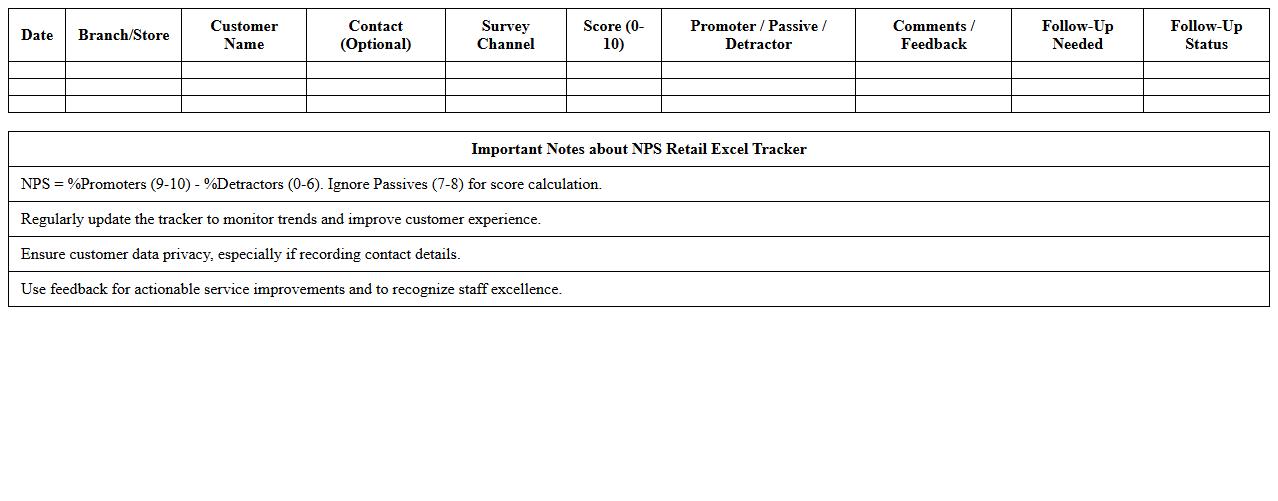
Net Promoter Score (NPS) Retail Excel Tracker
The
Net Promoter Score (NPS) Retail Excel Tracker document is a tool designed to measure and analyze customer loyalty and satisfaction within the retail sector by collecting and organizing NPS survey responses efficiently. It enables retailers to track customer feedback over time, identify trends, and pinpoint areas needing improvement to enhance the overall shopping experience. This document supports strategic decision-making by providing clear, data-driven insights that help increase customer retention and drive business growth.
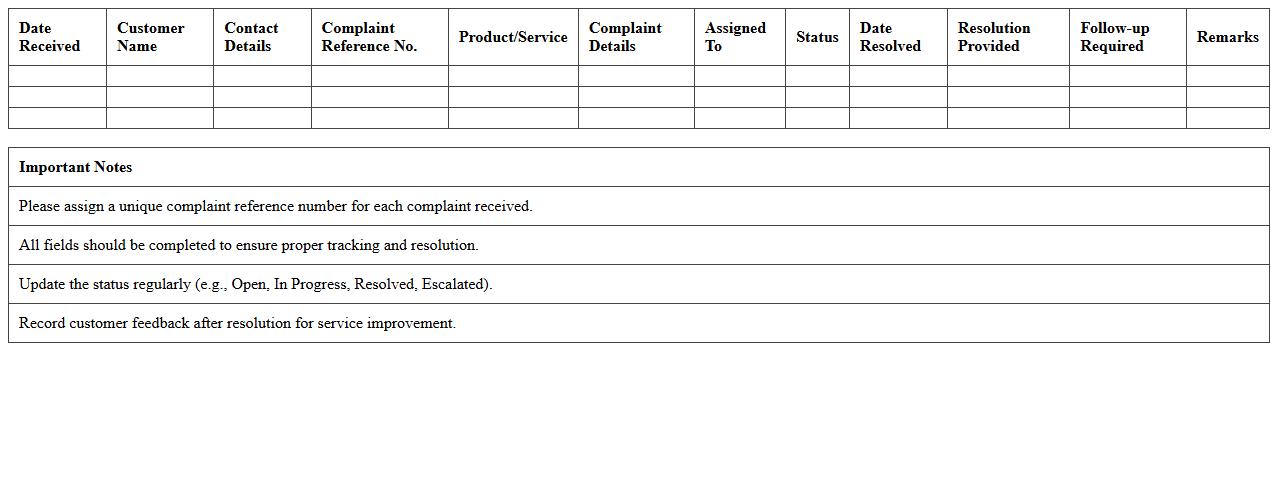
Retail Customer Complaint Resolution Log
A
Retail Customer Complaint Resolution Log document systematically records all customer complaints, tracking their details, responses, and resolutions. This log enables businesses to identify recurring issues, improve service quality, and ensure accountability in addressing customer concerns. By maintaining this document, retailers enhance customer satisfaction and foster long-term loyalty through effective complaint management.
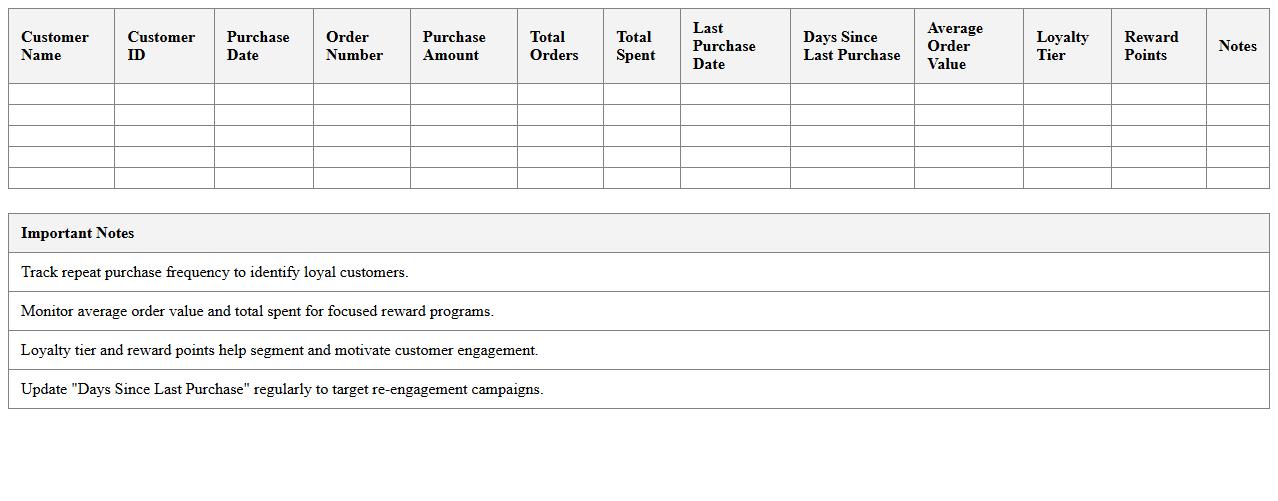
Repeat Customer Loyalty Metrics Excel Sheet
The
Repeat Customer Loyalty Metrics Excel Sheet is a comprehensive tool designed to track and analyze customer retention rates, purchase frequency, and loyalty trends. By organizing data into clear, easy-to-read formats, this document helps businesses identify patterns in repeat purchases and measure the effectiveness of loyalty programs. Utilizing these metrics enables companies to make informed decisions that enhance customer engagement and increase long-term revenue.
Retail Checkout Satisfaction Analysis Template
The
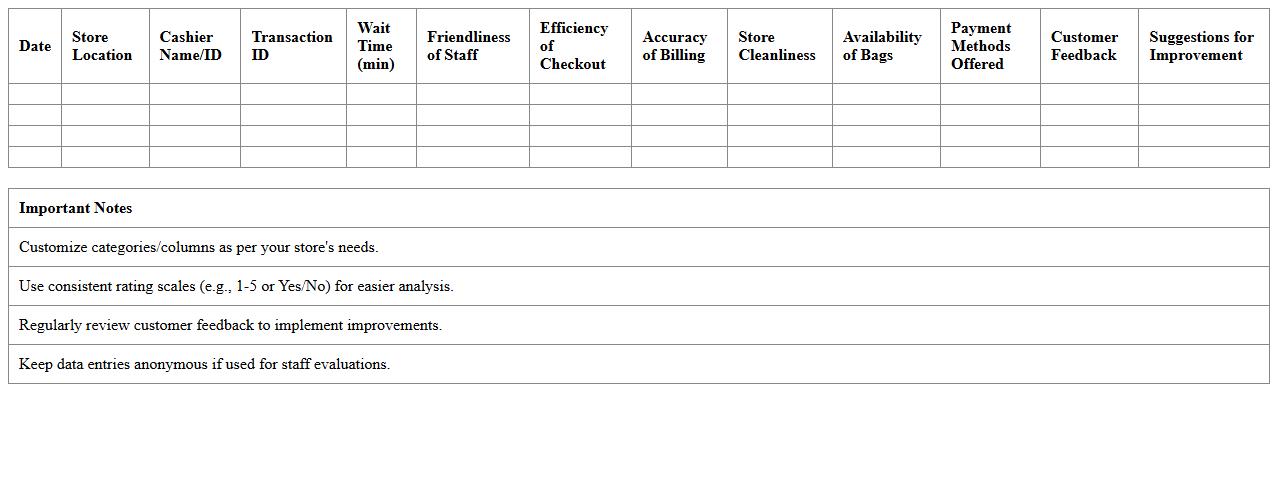
Retail Checkout Satisfaction Analysis Template document is a structured tool designed to evaluate customer experiences specifically during the retail checkout process. It systematically captures feedback on waiting times, staff behavior, and payment efficiency, enabling retailers to pinpoint areas needing improvement. Utilizing this template helps businesses enhance customer satisfaction, streamline operations, and increase overall sales performance.
Visual Retail Satisfaction Heatmap Excel Template
The
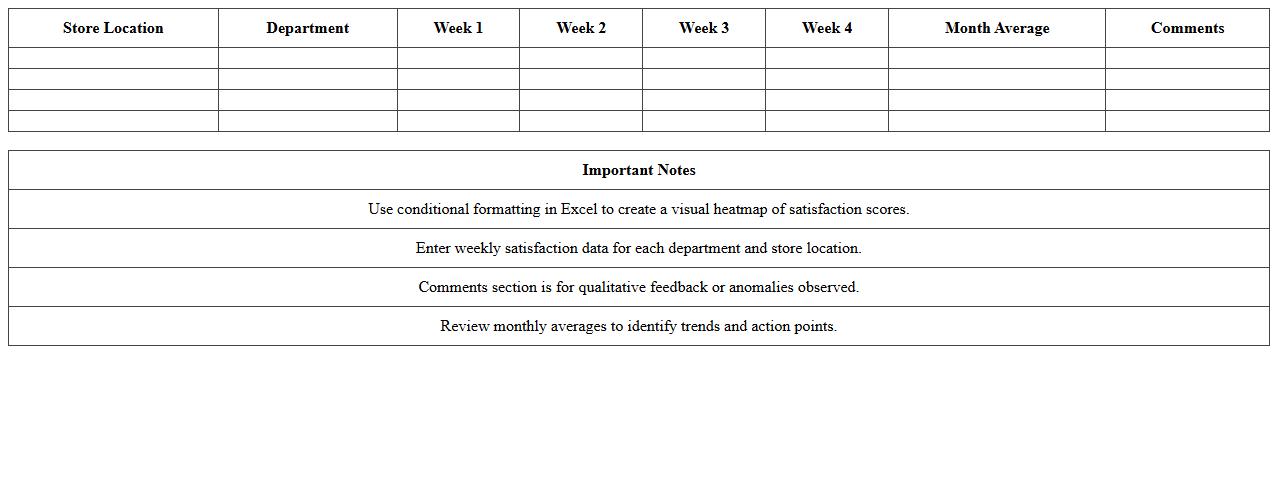
Visual Retail Satisfaction Heatmap Excel Template is a dynamic tool designed to analyze customer satisfaction data across multiple retail locations using color-coded heatmaps. It enables businesses to quickly identify areas with high or low customer satisfaction, facilitating targeted improvements and strategic decision-making. By visualizing complex data in an intuitive format, this template enhances the ability to monitor performance trends and optimize customer experience effectively.
How to customize customer satisfaction survey templates in Excel for retail data collection?
To customize customer satisfaction survey templates in Excel, start by defining the key metrics relevant to retail, such as product quality and staff behavior. Use Excel's table formatting and form controls like dropdown lists to make the template interactive and user-friendly. Ensure the template captures detailed, structured responses that simplify subsequent data analysis.
What Excel formulas best analyze customer feedback trends for store performance reports?
The most effective Excel formulas for analyzing customer feedback trends include AVERAGEIFS to calculate average scores across different product categories and COUNTIFS to track frequency of specific responses. Use TEXTJOIN combined with FILTER to compile open-ended feedback for qualitative insights. Additionally, SPARKLINE functions help visualize trends dynamically within your data set.
How to automate satisfaction scoring in Excel for retail purchase experiences?
Automate satisfaction scoring in Excel by assigning numerical values to survey responses using VLOOKUP or INDEX-MATCH formulas. Create a formula-driven scorecard that aggregates these values into an overall satisfaction score per transaction or customer. Implement conditional formatting to highlight scores that fall below your defined satisfaction threshold for quick identification.
Which Excel charts visually represent NPS (Net Promoter Score) in retail assessments?
To visually represent NPS (Net Promoter Score) in Excel, use a combination of clustered bar charts and gauge charts to display promoter, passive, and detractor proportions effectively. A stacked bar chart also helps in comparing NPS across different store locations or time periods. Complement these with line charts to track NPS trends over time for more comprehensive retail assessments.
How to link transaction data with satisfaction scores using Excel pivot tables?
Link transaction data with satisfaction scores by importing both data sets into Excel and creating a common key, such as a transaction ID, to unify the tables. Use a PivotTable to aggregate satisfaction scores by transaction attributes like date, store, or product category. This method allows dynamic slicing and dicing of data for insightful retail performance analysis.
More Assessment Excel Templates