The Cybersecurity Risk Assessment Excel Template for IT Departments streamlines the process of identifying, evaluating, and prioritizing potential security threats within an organization. This template allows IT teams to systematically document vulnerabilities, assess risk levels, and implement mitigation strategies efficiently. Customizable features and automated calculations help ensure comprehensive risk management tailored to specific departmental needs.
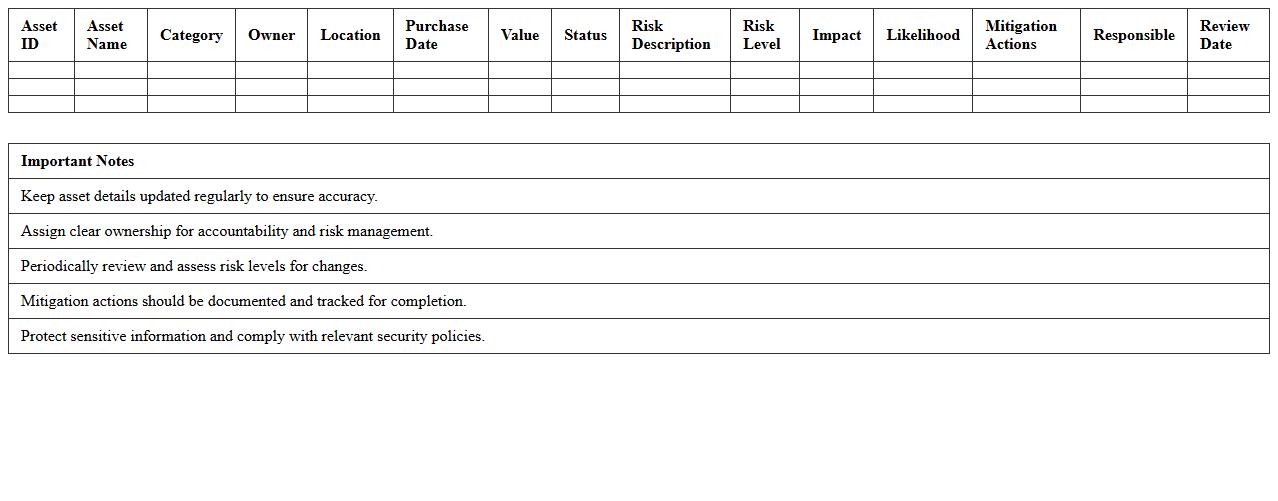
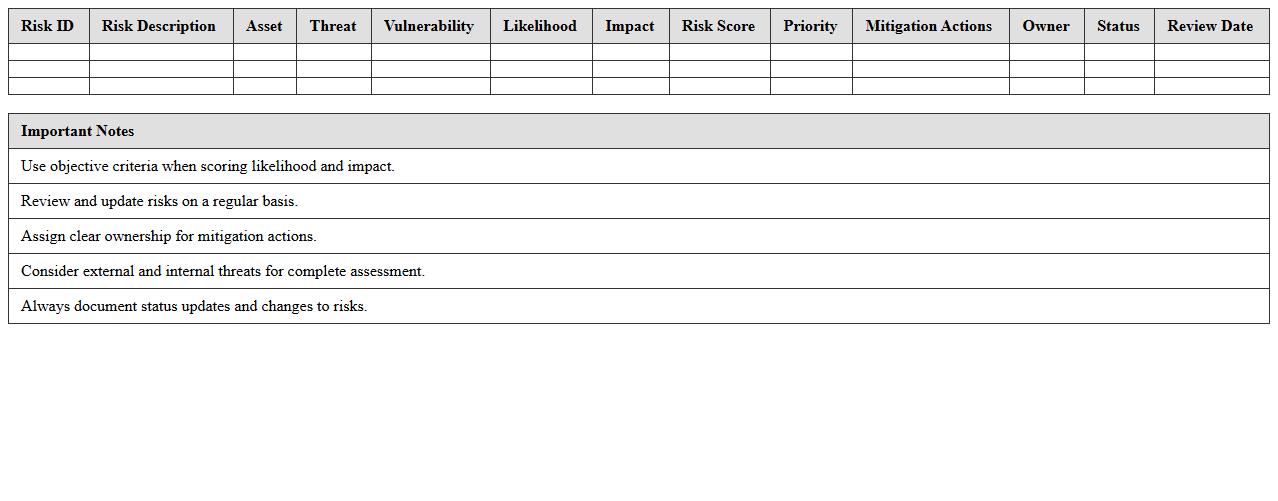
IT Asset Inventory and Risk Register Excel Template
An
IT Asset Inventory and Risk Register Excel Template document systematically records all IT assets such as hardware, software, and network components, alongside associated risks and vulnerabilities. It enables efficient asset management, risk assessment, and tracking of mitigation actions to enhance cybersecurity and compliance. This template supports informed decision-making by providing clear visibility into asset status and potential threats, reducing operational risks and improving IT governance.
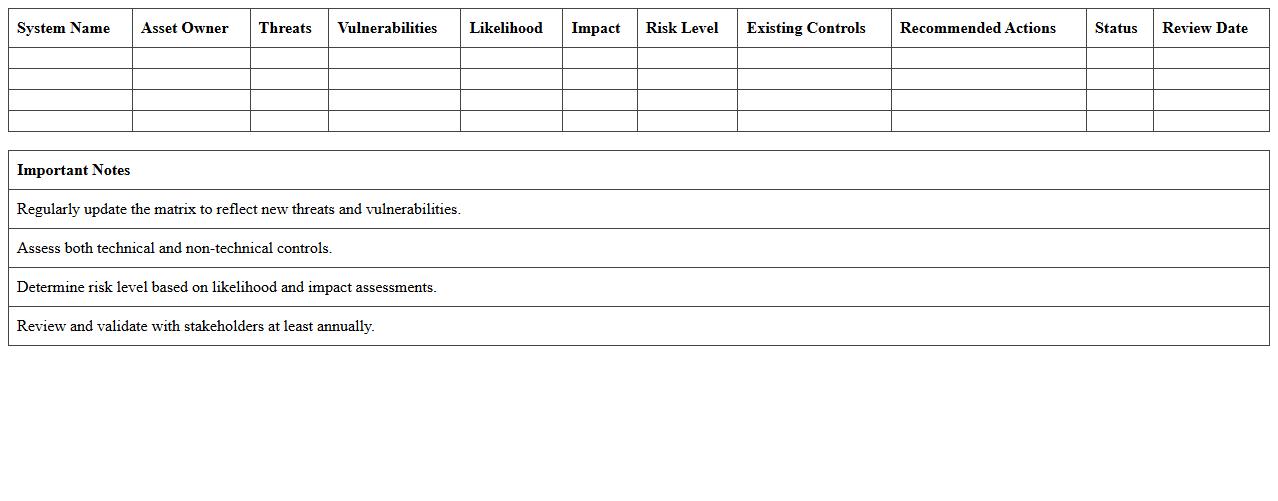
Vulnerability Assessment Matrix for IT Systems
The
Vulnerability Assessment Matrix for IT Systems document systematically categorizes and evaluates potential security weaknesses within an organization's technology infrastructure. It helps identify risks by assigning severity levels and possible impact, enabling IT teams to prioritize remediation efforts effectively. This matrix supports proactive defense strategies by providing a clear overview of vulnerabilities, ensuring the protection of critical assets and minimizing the likelihood of cyberattacks.
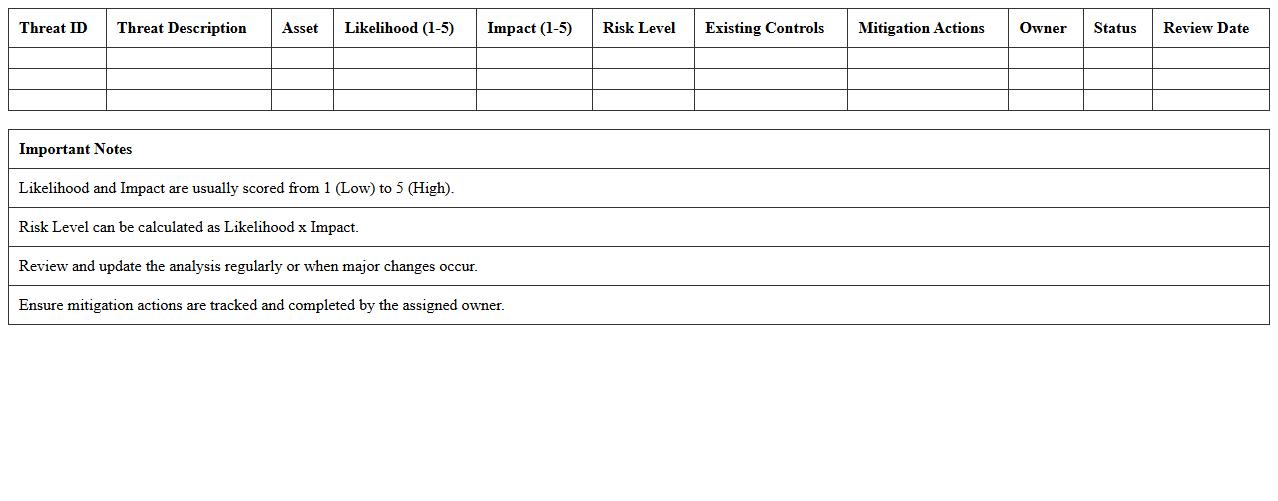
Threat Likelihood and Impact Analysis Spreadsheet
A
Threat Likelihood and Impact Analysis Spreadsheet document systematically assesses potential risks by evaluating the probability and consequences of various threats within an organization. It helps prioritize security measures by quantifying which threats pose the greatest danger based on their likelihood and impact scores. This tool enables informed decision-making, resource allocation, and enhances overall risk management strategies.
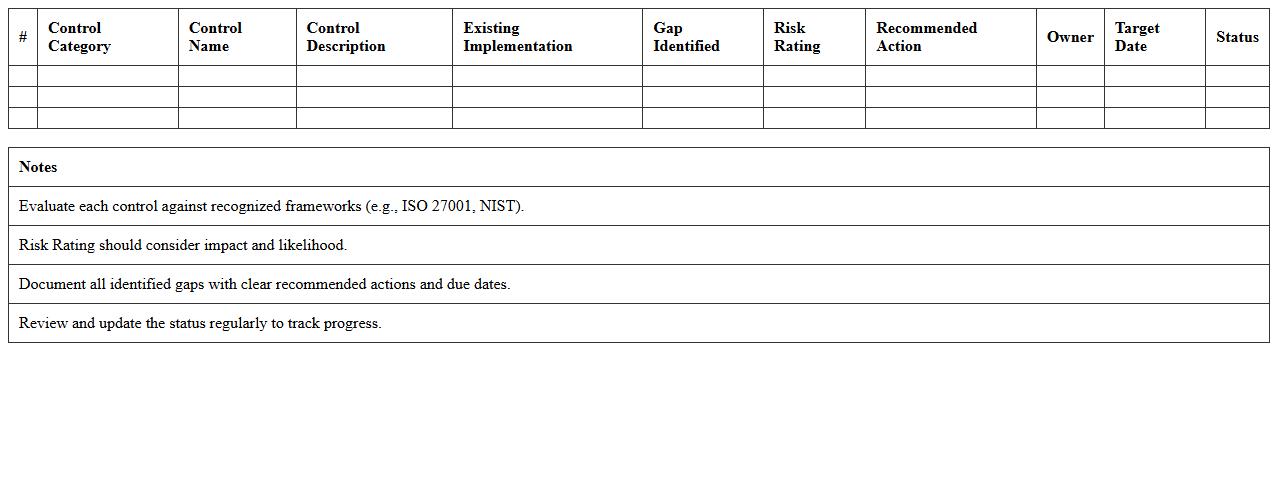
Cybersecurity Control Gap Analysis Excel Sheet
A
Cybersecurity Control Gap Analysis Excel Sheet document systematically identifies and evaluates discrepancies between existing security measures and required cybersecurity controls within an organization. It provides a clear, organized format to track compliance status, prioritize risk mitigation efforts, and allocate resources effectively. This tool enhances cybersecurity posture by enabling targeted improvements, ensuring adherence to industry standards, and reducing vulnerabilities.
Risk Prioritization Dashboard for IT Security
A
Risk Prioritization Dashboard for IT Security document visually consolidates and ranks cybersecurity threats based on their potential impact and likelihood, enabling organizations to focus on addressing the most critical vulnerabilities first. This tool supports informed decision-making by providing real-time data on risk levels, asset importance, and threat trends, improving overall security posture. It enhances resource allocation efficiency and accelerates response times to mitigate high-priority risks effectively.
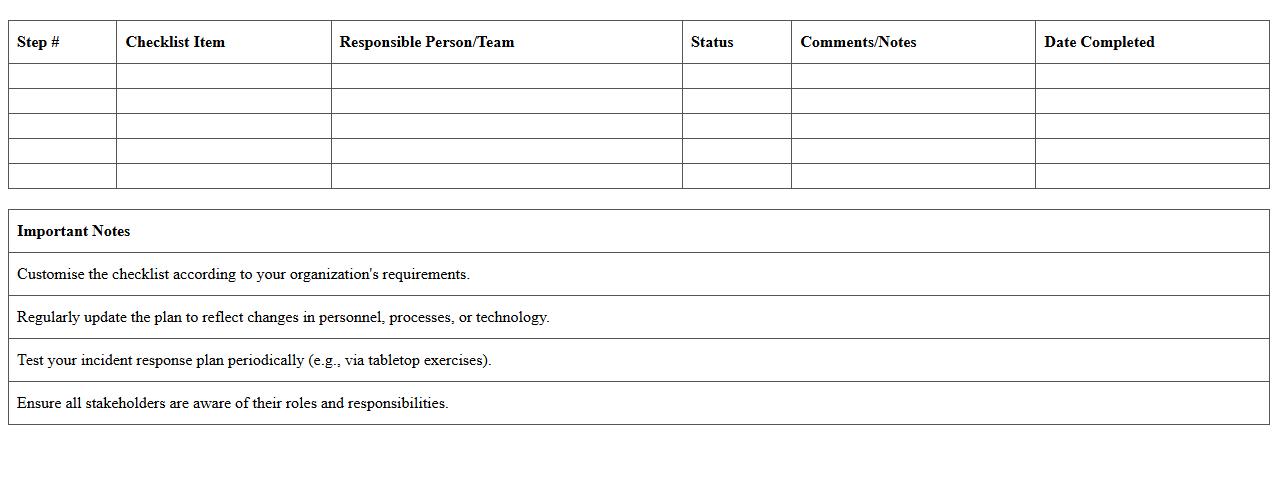
Incident Response Plan Checklist Excel Template
The Incident Response Plan Checklist Excel Template is a structured tool designed to help organizations systematically track and manage the steps involved in responding to security incidents. It outlines critical tasks such as identifying, analyzing, containing, and recovering from incidents, ensuring no vital step is overlooked. Using this
template enhances preparedness and streamlines communication among incident response teams, minimizing damage and downtime during cybersecurity events.
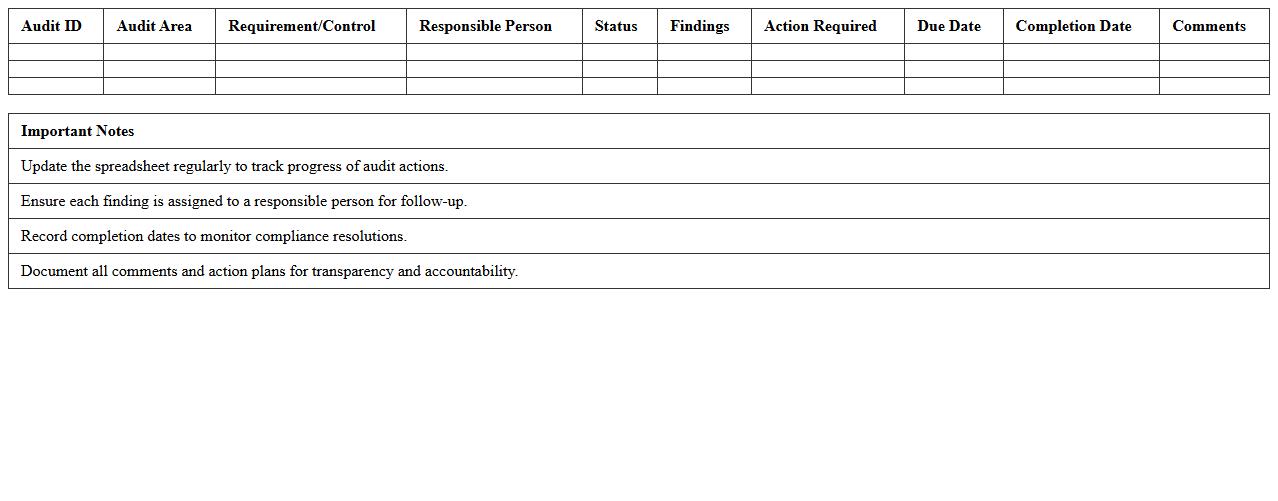
Security Compliance Audit Tracking Spreadsheet
A
Security Compliance Audit Tracking Spreadsheet is a detailed document designed to monitor and manage an organization's adherence to security policies and regulatory standards. It systematically records audit findings, remediation actions, deadlines, and responsible personnel, enabling clear visibility into compliance status. This tool helps organizations ensure continuous improvement, reduce risks, and demonstrate accountability during external audits or regulatory reviews.
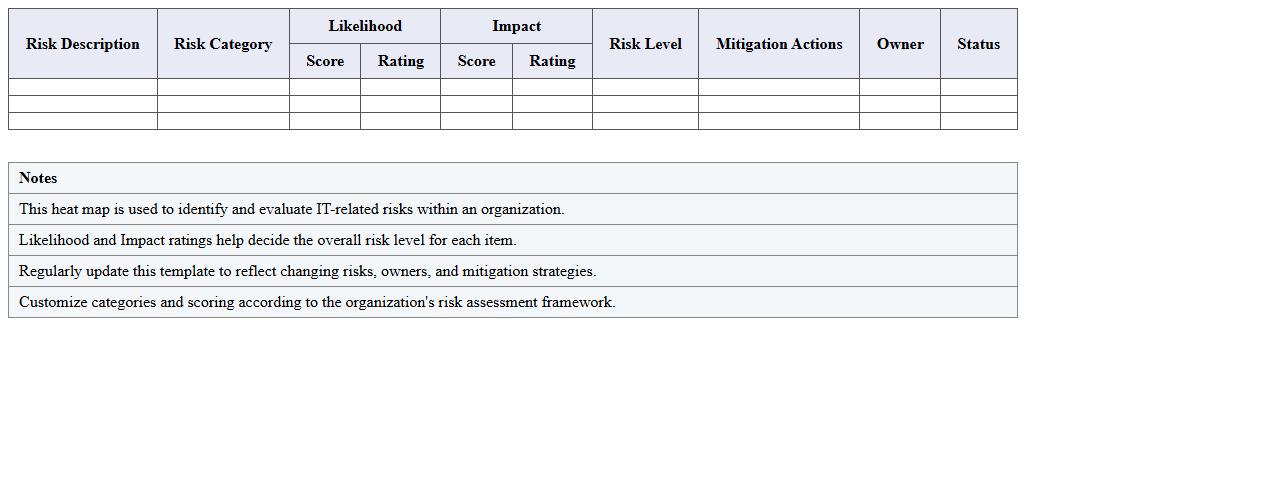
IT Department Risk Heat Map Excel Template
The
IT Department Risk Heat Map Excel Template is a structured tool designed to visually represent and prioritize potential IT risks by their likelihood and impact. This document helps organizations quickly identify critical vulnerabilities, allocate resources efficiently, and implement targeted mitigation strategies. Using this heat map enhances decision-making processes by providing clear, data-driven insights into risk management within the IT department.
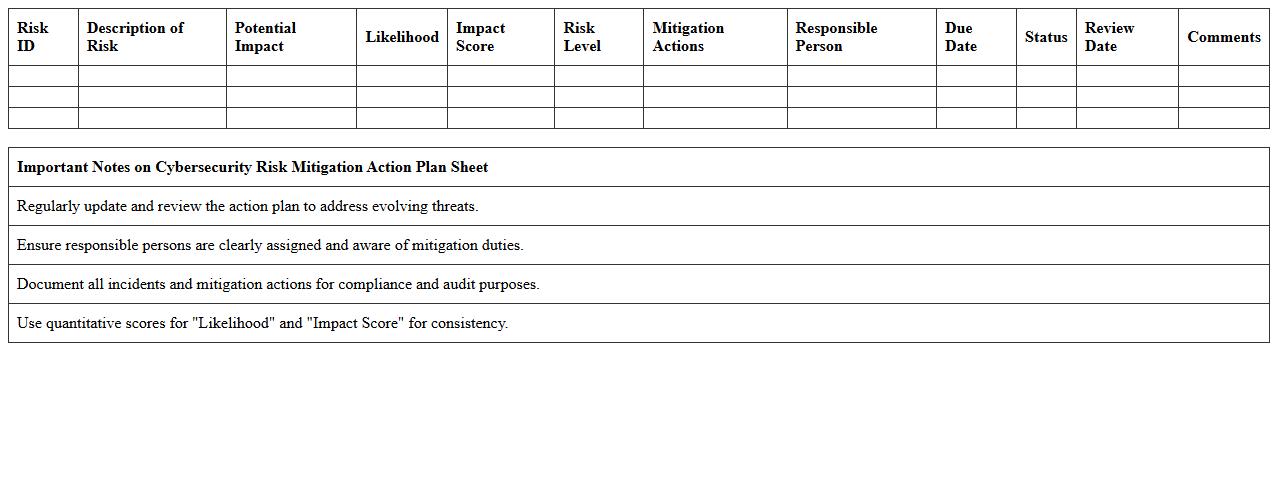
Cybersecurity Risk Mitigation Action Plan Sheet
The
Cybersecurity Risk Mitigation Action Plan Sheet document outlines specific strategies and steps to identify, assess, and reduce cyber threats within an organization. It enables teams to prioritize vulnerabilities, allocate resources effectively, and track the progress of mitigation efforts, ensuring a structured approach to enhancing security posture. This document serves as a critical tool for risk management, compliance adherence, and minimizing potential damage from cyber attacks.
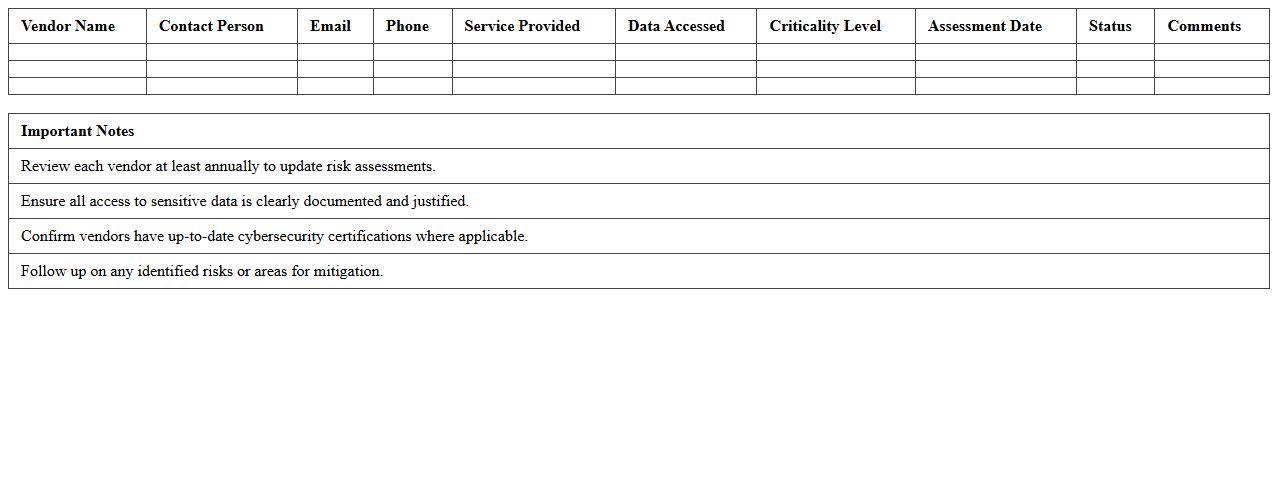
Third-Party Vendor Cyber Risk Assessment Excel Template
The
Third-Party Vendor Cyber Risk Assessment Excel Template document is a structured tool designed to evaluate the cybersecurity risks associated with external vendors. It helps organizations systematically identify, analyze, and mitigate potential vulnerabilities by tracking vendor compliance, security controls, and risk levels in a clear, organized format. Using this template improves risk management efficiency, enhances vendor oversight, and supports informed decision-making to protect sensitive data and maintain regulatory compliance.
What key cybersecurity risk metrics should be included in an IT department's Excel assessment template?
Key cybersecurity risk metrics to include are vulnerability severity levels, threat likelihood, and potential impact scores. These metrics help prioritize risks based on their potential damage and probability of occurrence. Additionally, tracking remediation status and risk owner facilitates accountability in managing cybersecurity threats.
How can Excel be structured to track remediation progress for identified cyber risks in documents?
Excel can be structured using tables with columns for risk description, assigned personnel, remediation steps, and status updates. Conditional formatting can visually highlight the progress status from 'Not Started' to 'Completed'. Adding timestamped notes and status dates ensures clear tracking of remediation timelines.
What formulas or macros can automate risk scoring in cybersecurity assessments within Excel?
Automated risk scoring can be achieved using formulas like =IF() statements to assign risk levels based on severity and likelihood inputs. Macros can streamline repetitive tasks such as updating scores and generating summary reports. Integrating VLOOKUP or INDEX-MATCH functions enhances dynamic risk data referencing.
How should sensitive data in a cybersecurity risk Excel sheet be protected from unauthorized access?
Protect sensitive data by using Excel's built-in password protection features and encrypting the file during saving. Limiting access through restricted permissions on shared drives or cloud platforms enhances security. Additionally, using hidden sheets or cell locking prevents unauthorized editing or viewing of critical information.
What best practices exist for version control of Excel-based cybersecurity risk assessments in IT?
Best practices for version control include maintaining a clear version history with dates and author details in a dedicated column or separate log sheet. Storing Excel files within a version-controlled repository such as SharePoint or Git helps track changes effectively. Regularly archiving previous versions ensures recovery and audit compliance if needed.
More Assessment Excel Templates